How to Turn Your API into an MCP Server - Straight From Your OpenAPI Spec (No Code)
AI agents reach APIs through MCP. Here's how to generate an MCP server straight from your OpenAPI spec, expose only the tools you want, and keep them aligned.
TL;DR: The Model Context Protocol (MCP) is an open standard that lets AI clients like Claude and Cursor discover and call external tools through a standardized interface. To make your API usable by agents, you need an MCP server that presents your endpoints as tools. Instead of hand-writing and maintaining one, Theneo generates it directly from the OpenAPI spec you already keep. You pick which operations to expose, set a transport and authentication, and click generate. Update your spec, regenerate, and your agent tools stay aligned with your API, with no separate codebase to maintain.
Your next big API consumer isn't a developer. It's an agent.
For twenty years, "who uses your API" had one answer: developers, reading your docs and writing integration code by hand. That's changing fast. AI agents are becoming primary consumers of APIs, and agentic AI systems don't read your reference page or copy a cURL snippet. They connect through the Model Context Protocol (MCP), the open standard that lets clients like Claude and Cursor discover what an API can do and call it directly.
Here's the catch. An agent can only use your API if there's an MCP server describing it as a set of tools. Build that server by hand and you've just created a second artifact to write, test, secure, and, worst of all, keep aligned every time your API changes. Miss one update and your agent is calling endpoints that no longer exist or passing parameters that were renamed three sprints ago.
There's a better way: generate the MCP server from the spec you already maintain. This guide walks through what MCP is, how it differs from your OpenAPI spec, why hand-building servers breaks down, and how to turn your OpenAPI spec into a ready-to-run MCP server in a few minutes.
What is MCP, and why does your API need one?
The Model Context Protocol (MCP) is an open standard that lets AI clients discover and invoke external tools and data through a standardized interface. Think of it as the layer that translates "your API" into "a set of structured tools an agent understands."
When an MCP-compatible client connects to your server, it can discover the available operations (tool discovery), understand what each one does and what inputs it needs, and call them in real time, the same way a developer would read your docs and make a request, except automated end to end. If you've worked with LLM function calling, MCP is the standardized, transport-level version of the same idea: a consistent way for agents to find and use tools across many clients.
Without an MCP server, your API isn't natively discoverable by MCP-compatible clients. An agent might still reach it by reading your docs or through custom function-calling glue, but there's nothing that lets a client automatically find your endpoints, understand them, and call them safely. An MCP server is what makes your API agent-ready by default, and increasingly, agent-ready is a requirement rather than a nice-to-have.
OpenAPI vs MCP: how they relate
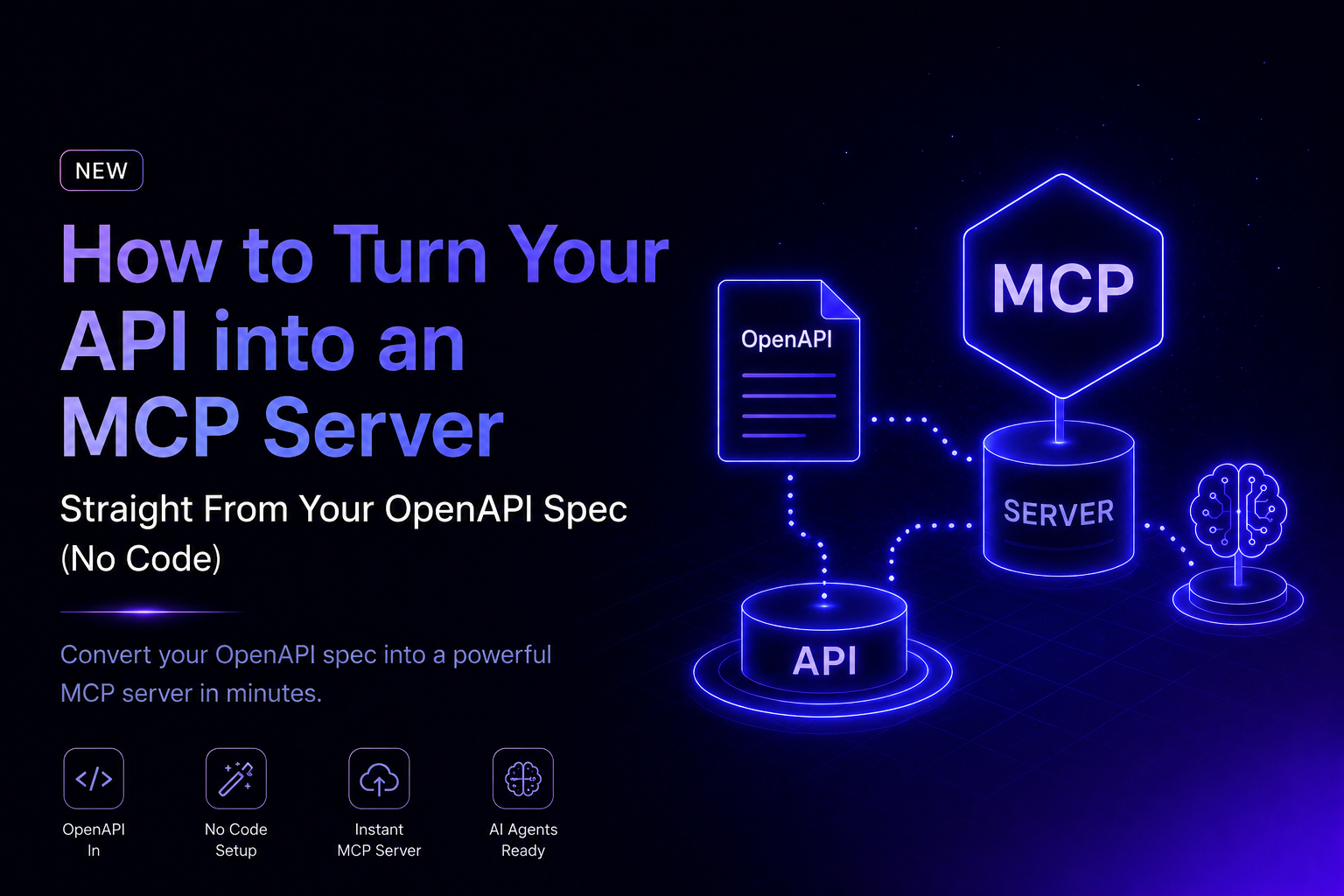
They're complementary, not competing. Your OpenAPI spec is the contract that describes your API; MCP is what exposes that contract as tools agents can act on.
- OpenAPI describes your API. It's a reference contract of endpoints and schemas, written for developers and docs tooling. It answers the question, "What does this API look like?"
- MCP exposes your API as tools. It's a tool interface that lets AI agents discover, understand, and call your operations. It answers a different question, "What can an agent actually do with this API right now?"
The takeaway: you don't replace OpenAPI with MCP. You generate MCP from OpenAPI, which is exactly why keeping a single source of truth matters.
The problem with building an MCP server by hand
You can write an MCP server manually. Teams do. But it introduces the same failure mode that has plagued API documentation forever: drift.
Your OpenAPI spec is the source of truth for your API. A hand-built MCP server is a copy of that truth, maintained separately. Every schema change, new endpoint, renamed parameter, or updated auth rule has to be mirrored in the server by a human who remembers to do it. When they don't, the agent's view of your API silently diverges from reality. And unlike a broken docs page a developer can spot, a drifted MCP server fails quietly, mid-task, inside someone else's AI workflow.
Here's how the two approaches compare in practice:
- Source of truth. A hand-built server is a separate copy of your API. A generated server comes from the OpenAPI spec you already maintain.
- Keeping it current. By hand, you mirror every API change manually. Generated, you update the spec and regenerate.
- Code to maintain. A hand-built server is a whole codebase you own forever. A generated server has none.
- Risk of drift. Hand-built servers drift silently and fail without warning. Generated servers stay tied to one source of truth.
- Time to first tool. Hand-building takes days. Generating takes minutes.
- The fix is to stop maintaining two things. Generate the server from the spec, so there's one source of truth and the tools reflect your API whenever you regenerate.
From spec to tool: what "generating" actually produces
Generation maps each API operation you select to a structured, well-described tool the agent can call. A single OpenAPI operation becomes one tool:
GET /users        →  getUsers()      inputs: page, limit
POST /tickets     →  createTicket()  inputs: subject, body
The agent sees getUsers and createTicket as tools it can discover and invoke, with the descriptions, parameters, and types carried straight over from your spec. No hand-written wrappers, no translating schemas by hand.
How the flow works, end to end
The path from spec to agent is short. Your OpenAPI spec is generated into an MCP server inside Theneo. An MCP client such as Claude or Cursor connects to that server, discovers the available tools, and calls the ones it needs. The server forwards each call to your live API and passes the response back to the client. Your spec stays the source of truth at one end, your API does the real work at the other, and the generated server is the bridge between them.
How to turn your OpenAPI spec into an MCP server
Theneo generates a ready-to-run MCP server from your existing OpenAPI spec, with no extra code to write or keep in sync. The flow has three stages: configure, generate, connect.
Open the MCP configuration page at editor.theneo.io/mcp and work through the settings below.
1. Set your base URL
Point the server at the API it should call. Specify a custom base URL (for example, https://api.example.com), or leave it empty to use the base URL already defined in your OpenAPI spec. Most teams can leave this alone, and override it only when your agent-facing environment differs from what's in the spec.
2. Choose a transport method
The transport determines how your MCP server communicates with clients. Theneo supports three.
- STDIO (standard input/output) is the reference transport for local MCP setups. It's best for local development and CLI-based integrations, so start here when you're testing.
- HTTP is standard HTTP transport, recommended for server-to-server and web deployments. This is the usual choice for production.
- Server-Sent Events (SSE) is real-time, one-directional streaming from server to client, ideal for live updates.
A good rule of thumb: STDIO to test locally, HTTP or SSE when you ship.
3. Expose only the operations you want
This is the step most people underuse. The API operations list shows every endpoint from your spec, each with its HTTP method, path, and description. Use the checkboxes to include or exclude individual operations, or hit Deselect All and reselect just what you need.
Only the operations you select are exposed through the generated server. That means you can ship a focused, intentional set of tools, the handful of endpoints an agent actually needs, rather than dumping your entire API surface into an AI client. Fewer, well-chosen tools make agents more reliable and reduce the ways things can go wrong.
4. Configure authentication and security
You don't want just any client calling your API. Theneo detects the security schemes from your OpenAPI spec automatically, whether your spec uses API keys, bearer tokens and JWT, or OAuth. For each scheme, you define the environment variable name the server uses to resolve the credential at runtime.
This detail matters: credentials are resolved from environment variables in your own runtime, so secrets are never baked into the generated server. You set the actual values where the server runs, and the server reads them at startup.
5. Tune the advanced settings (optional)
Two settings help agents behave well against real-world APIs.
- Request timeout (ms) is the maximum time the server waits for a response before timing out. It defaults to 30,000 ms (30 seconds); adjust it to match your API's expected response times.
- Pagination hints add pagination support for list operations, helping AI clients understand how to page through results instead of stopping at the first page.
6. Generate and connect
Click Generate MCP server. Theneo processes your configuration and produces a ready-to-use server based on your spec and chosen options. Any MCP-compatible client can then connect and start discovering, understanding, and calling your API.
Before you start the server, set every required environment variable in your runtime. Missing credentials are the most common cause of authentication failures on first run. And you can return to editor.theneo.io/mcp anytime to regenerate with new settings or a different selection of operations.
Note: MCP server generation may need to be enabled for your workspace or project. If you don't see it, email hello@theneo.io and the team will switch it on.
A real-world example: a support chatbot needs three tools, not thirty
Say your API has 40 endpoints, but you're building an AI support assistant. That assistant doesn't need your whole surface area. It needs to look up a customer, open a ticket, and update it. So you expose exactly three operations:
getCustomer, to pull the customer's account and plancreateTicket, to open a new support ticketupdateTicket, to add a note or change status
The agent gets a tight, purpose-built toolset it can reason about reliably, and your billing, admin, and internal endpoints stay off-limits. This is the payoff of selective operation exposure: safer agents, clearer behavior, and no accidental access to operations that were never meant for an AI client.
Common mistakes to avoid
- Exposing every endpoint. More tools isn't better. A bloated toolset confuses agents and widens your risk surface. Select the operations that map to what the agent is actually for.
- Exposing admin or destructive operations. Keep delete, billing, and internal-admin endpoints out of agent-facing servers unless you have a deliberate reason and guardrails.
- Hardcoding secrets. Resolve credentials from environment variables in your runtime. Never bake them into the server or share them in the config.
- Forgetting to regenerate after a spec change. The server reflects the spec at generation time. When your API changes, update the spec and regenerate so your tools stay aligned
- Shipping STDIO to production. STDIO is for local testing. Use HTTP or SSE for server-to-server and web deployments.
- Ignoring pagination on list endpoints. Without pagination hints, agents may stop at the first page of results and reason on incomplete data.
Why generating beats hand-building, the short version
The whole point is to stop maintaining two versions of the truth. Generating from your spec gives you one source of truth, so keeping tools aligned with your API is a regenerate step rather than a manual rewrite. There's no new code to maintain, no second artifact, and no manual mirroring of every change. You get an intentional tool surface, exposing exactly the operations you want instead of your whole API. Your secrets stay yours, resolved from environment variables in your runtime and never baked into the server. And you get production-ready transports and controls, including STDIO, HTTP, and SSE, plus timeouts and pagination hints for reliable agent behavior.
MCP works the other way, too: let AI edit your docs
Everything above exposes your API to AI clients. Theneo also ships an MCP server that does the reverse. It exposes your documentation so an assistant like Claude or Cursor can help you write and maintain it. Connect it once, and instead of copy-pasting between your AI tool and your docs editor, the assistant works directly inside your documentation through a set of structured tools:
- Browse structure, to walk the full section tree of a project, with names, slugs, and IDs.
- Search docs, to find sections by keyword across names, slugs, and content.
- Read content, to pull a section's full content or just the fields you need.
- Edit content, to make precise, surgical edits to a section, including its rich-text body, leaving the rest untouched.
- Add and remove sections, to create new sections nested anywhere in the tree, or delete ones you no longer need.
In practice, you point the assistant at your project and work in natural language: "restructure this section," "fix this page," "draft a new guide." It reads what exists and applies the changes. Connecting takes a few minutes. You add Theneo as a custom connector in your MCP client, authorize with your Theneo API key, and give the assistant your project ID. (This feature is available on request; email hello@theneo.io to enable it.)
Together, the two directions make Theneo fully MCP-native: your API becomes tools agents can call, and your docs become something AI can help you build and maintain.
Make your API agent-ready
Agents are already part of how software gets built and integrated, and the APIs they can actually use will win the integrations. The fastest path there isn't writing and babysitting a separate MCP server. It's generating one from the spec you already maintain, so your tools never fall out of alignment with your API.
Turn your OpenAPI spec into an MCP server in minutes: expose only the tools your agents need, keep them aligned with your spec by regenerating on change, and connect from any MCP-compatible client. Open your MCP settings at editor.theneo.io/mcp, or start a free Theneo workspace to try it on your own API.
Frequently Asked Questions
What is an MCP server?
An MCP server describes an API (or another system) as a set of structured tools that AI clients can discover, understand, and call through the Model Context Protocol. It's the bridge that makes your API usable by agents like Claude and Cursor.
How is MCP different from my OpenAPI spec?
OpenAPI describes your API as a contract for developers and tooling. MCP exposes that API as callable tools for AI agents. You generate an MCP server from your OpenAPI spec, so they work together rather than as substitutes.
What's the difference between generating an MCP server and Theneo's MCP Server for docs?
Generating an MCP server exposes your API to AI clients so agents can call it. Theneo's MCP Server exposes your documentation so AI can help you write and maintain it. They're two directions of the same protocol.
Do I need to write code to create an MCP server?
No. Theneo generates the server directly from your existing OpenAPI spec. You configure options in a settings page and click generate. There's no server code to write or maintain.
How do I keep the MCP server aligned with my API?
The server is generated from your OpenAPI spec, your single source of truth. When your spec changes, regenerate the server so the tools reflect the update. There's no separate codebase to hand-edit.