Agent Retrieval vs MCP: What Each Solves for Documentation Teams
Agent retrieval finds relevant documentation. MCP connects AI applications to structured tools and resources. Learn why documentation teams often need both.
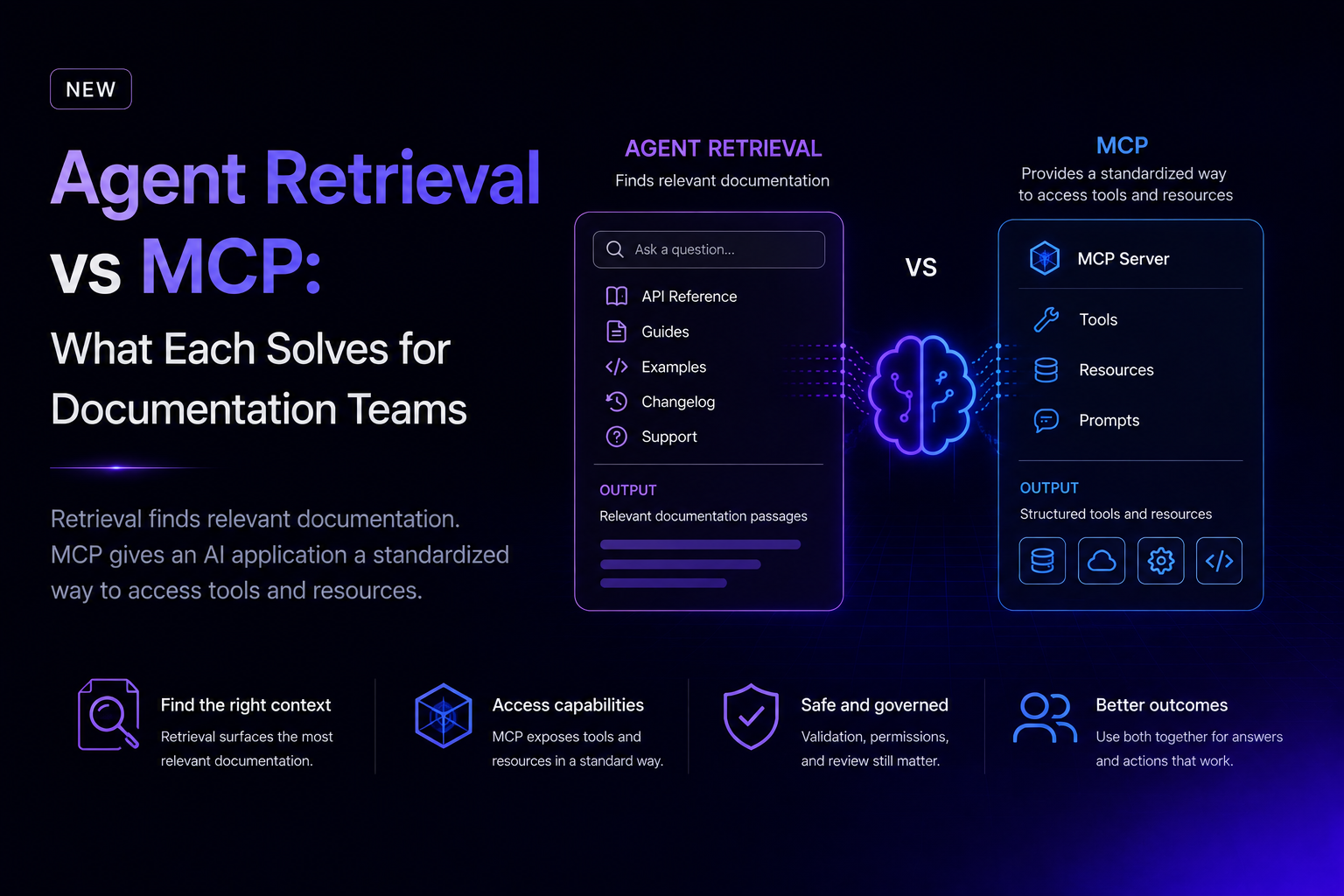
Agent retrieval finds relevant documentation. MCP gives an AI application a standardized way to access tools and resources. They solve related but different problems, and searchable documentation alone is not enough for an agent to use an API reliably.
What is agent retrieval
Agent retrieval finds and returns the most relevant documentation for a question or task. It may search guides, API references, examples, changelogs, and support content, then place selected passages into the model's working context.
Retrieval helps answer which authentication method to use, what a field means, which endpoint applies, or what changed. Its output is context. Context can help a model explain an API or plan an integration, but it does not automatically define a safe, callable action.
What is MCP
Model Context Protocol, or MCP, is an open protocol for connecting AI applications to external tools, resources, and prompts through a consistent interface. In documentation workflows, an MCP server can expose structured capabilities that an agent can discover and call.
Theneo provides MCP server generation for API projects. MCP is an interaction layer: it can describe tools and inputs, while retrieval primarily supplies information for reasoning.
Agent retrieval vs MCP: what does each solve
QuestionAgent retrievalMCPPrimary outputRelevant documentation passagesStructured tools and resourcesCore problemFinding contextConnecting AI applications to capabilitiesConceptual questionsStrong fitPossible when resources expose contextSafe API action by itselfNoNo. Validation, authentication, policy, and review still matter
The practical answer is not retrieval or MCP. Documentation teams often need both: retrieval for explanation and discovery, and a tool interface for controlled action.
Why is searchable documentation not enough
Search can retrieve the right page and still leave gaps. An agent may find an endpoint description without knowing which account is in scope, whether an action is destructive, which fields are controlled by policy, or whether a newer release changed the workflow.
- AI accuracy limits: A model can misread a passage, combine incompatible examples, or infer behavior the source never states.
- Retrieval noise: Similar terms across versions, products, or user profiles can return plausible but irrelevant context.
- Incomplete knowledge: Documentation may omit operational rules, permission boundaries, or recent changes.
- Human review: High-impact actions still need approval or confirmation based on business risk.
These are not reasons to avoid AI. They are design constraints for dependable documentation and agent workflows.
What should teams publish for retrieval
- Definition-first pages with one subject per section
- Clear version and environment labels
- Authentication and permission requirements
- Complete request and response examples
- Error conditions and recovery steps
- Changelogs tied to affected endpoints and guides
- Canonical pages instead of near-duplicates
Machine-readable formats such as llms.txt can improve discovery, but they do not guarantee correct answers. They are publishing signals, not accuracy guarantees.
What should teams define for MCP
An MCP-connected capability needs more than an endpoint name. Define the tool's purpose, required inputs, expected outputs, authentication model, error states, side effects, and confirmation steps.
Start with narrow, reversible tasks. A read-only lookup is easier to validate than a tool that changes billing or deletes data. Ask whether the agent can tell when a tool applies, whether parameters are precise, whether permissions are visible, whether results can be verified, and when a human must confirm the action.
How do retrieval and MCP work together
Consider an agent helping a developer configure webhooks. Retrieval can find the conceptual guide, supported event types, and troubleshooting notes. An MCP tool can expose a structured operation to list settings or create a configuration. The documentation explains the decision; the tool performs a bounded action.
- Retrieve the relevant guide and reference material.
- Identify the user's intent, environment, and permissions.
- Select a narrowly defined tool.
- Validate inputs and surface side effects.
- Request human confirmation when risk warrants it.
- Execute the call and verify the result.
How should teams measure agent readiness
Do not treat AI visibility or retrieval success as an exact score. Sample priority questions and tasks, then record whether the correct source was retrieved, the right tool was selected, and the answer used current documentation. Track outcomes such as fewer failed integrations only when grounded data exists.
The bottom line
Retrieval helps an agent know. MCP helps an agent connect. Neither replaces accurate documentation, careful tool design, access control, or human judgment. Build the knowledge layer and interaction layer together, then test both against real tasks and known failure cases.
Frequently Asked Questions
What is agent retrieval?
Agent retrieval finds and returns relevant documentation passages.
What is MCP?
MCP connects AI applications to external tools, resources, and prompts through a consistent interface.
Is searchable documentation enough for an AI agent to use an API?
No. Search provides context but does not define permissions, side effects, validation, or a safe action.
Does MCP replace API documentation?
No. MCP tools still need accurate descriptions, examples, permissions, errors, and guidance.
Why does AI still need human review?
Models can misread context, retrieve the wrong version, or infer unsupported behavior. Human review remains necessary.