How to Review Documentation Before Publishing (Without Git)
Learn how to review documentation before publishing using branches, approvals, previews, and side-by-side diffs — without Git. Prevent mistakes, improve collaboration.
A practical guide to the documentation review workflow: branches, diffs, approvals, and previews, from the engineer who built it at Theneo.
Key takeaways
- Publishing documentation straight to production risks shipping unreviewed, incorrect content to the readers who depend on it.
- A documentation review workflow adds a branch → review → approve → merge step so every change is checked before it goes live.
- Side-by-side document diffs and a rendered preview let reviewers see exactly what changed, in words and in layout.
- Configurable approval rules add governance without slowing teams down.
- Done right, the whole workflow needs no Git knowledge, so technical writers, product managers, and support can take part alongside engineers.
In short: Documentation review is a structured process where documentation changes are drafted on a branch, reviewed, approved, and merged before publication. Below is how the workflow works, how it compares to Git pull requests, and what it took to build one that hides Git entirely.
For most of Theneo's history, a documentation change went live the moment someone hit publish. No staging, no second pair of eyes, no way to see what was about to change before it changed. For a typo, fine. For a breaking change to an authentication guide (or a wrong step in a setup tutorial) that thousands of developers rely on, less fine.
That risk isn't hypothetical. In Postman's State of the API report, a lack of documentation has repeatedly ranked as the single biggest obstacle developers face when consuming an API, cited by more than half of respondents. When the docs are the product's front door, an unreviewed edit isn't a small mistake; it's the first thing a developer sees before they give up.
I led the engineering on the feature we built to fix that. This is how the workflow works, how it compares to the Git model it borrows from, and what it took to build.
What is documentation review?
Documentation review is a structured workflow in which documentation changes are drafted on a branch, reviewed and commented on, approved by designated reviewers, and merged before they are published. It brings the discipline of a code review to docs: nothing reaches readers without a check, and every change carries a record of who approved it.
Theneo Documentation Review applies that workflow across your whole documentation set, not just API references and specs, but guides, tutorials, changelogs, and internal docs too. Whether the change is a reworded paragraph or an updated endpoint, it moves through the same branch, review, and approval flow.
The model will be familiar to anyone who has used GitHub pull requests, GitLab merge requests, or Bitbucket: a proposed change sits apart from the live version until it's been reviewed and approved. The difference, and the hard part, is delivering that to a team that isn't all engineers.
Why publishing documentation directly to production is risky
Publishing straight to production is risky because unfinished edits, missing approvals, and poor change visibility let incorrect documentation reach readers before anyone has checked it.
Docs are a team sport. On a single guide, an engineer verifies the endpoint and payload, a product manager confirms the behavior matches what actually shipped, and a technical writer makes it readable. When all of that happens directly against live documentation, three things break at once.
Unfinished edits leak to readers before they're ready. Feedback scatters across Slack threads, comments, and hallway conversations with no single home. And reviewers can't cleanly separate the proposed change from everything around it, so "can you take a look?" becomes "can you re-read the whole page and guess what's different?" It gets worse when several people edit at the same time.
Engineering teams solved a version of this years ago with version control and pull requests. Documentation teams mostly didn't. They got either a heavyweight Git pipeline that excluded non-engineers, or a wiki like Confluence with no real review gate. We wanted the rigor of the first without the barrier to entry.
The documentation review workflow, step by step
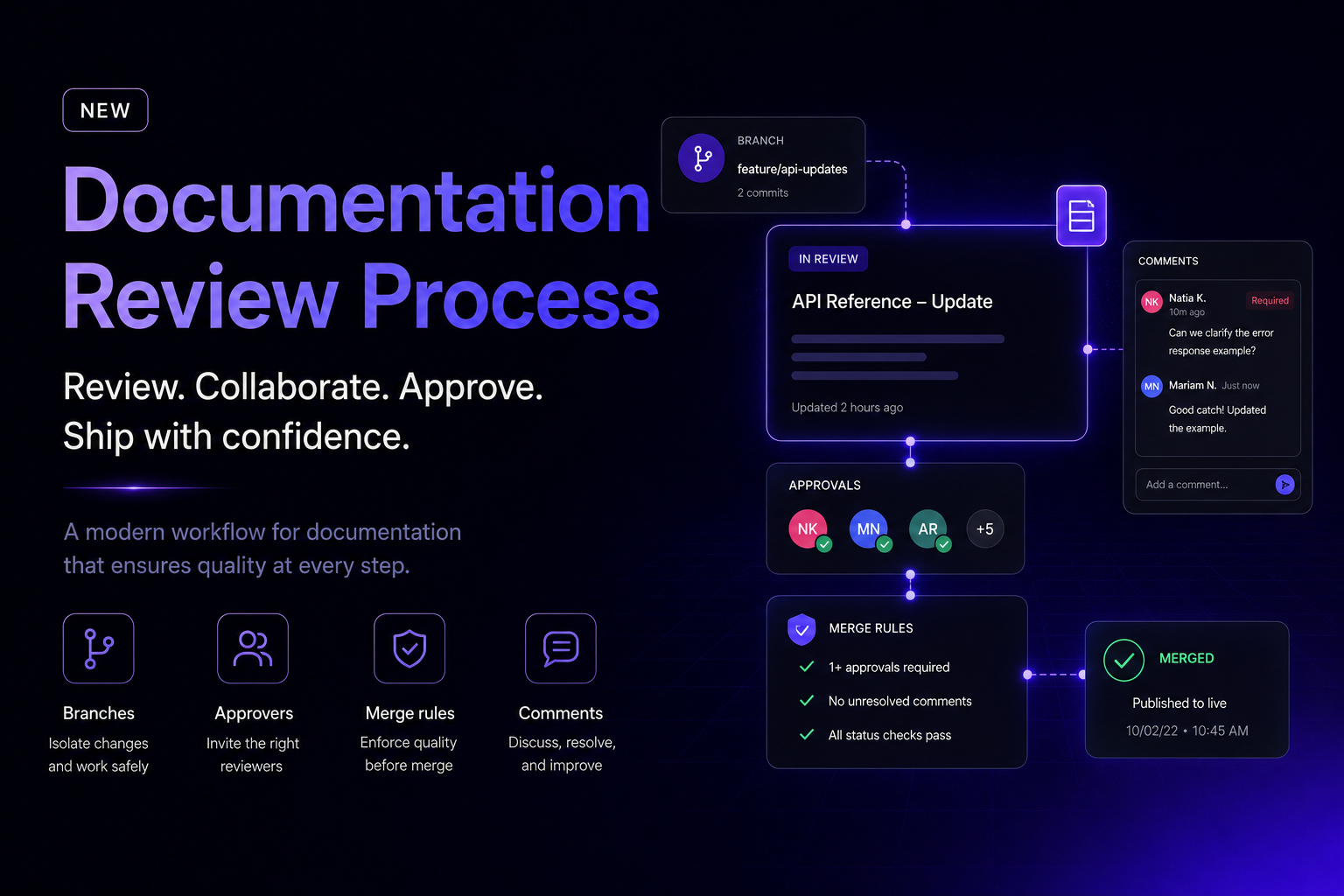
Documentation Review is a branch-based documentation review workflow. The shape will feel familiar to anyone who's opened a PR:
- Create a branch off your live docs and draft changes safely, without touching what's published.
- Edit and discuss: make your changes, preview them, and use inline comments to raise questions right where the change lives.
- Request approval and assign approvers, who see exactly what changed.
- Review the diff: approvers compare the branch to the base in a side-by-side Split view, inspect the rendered result in Preview, and approve, request changes, or comment.
- Satisfy the merge rules, for example a required minimum number of approvals before a branch can merge.
- Merge and publish, with a clear, auditable trail of who approved what.
The underlying collaboration problem is identical to code review: a change should be visible, reviewable, and intentional before it becomes the new source of truth. What we didn't want to borrow was the part where you need to understand Git to participate.
Documentation Review vs. Git pull requests
Both give you branches, review, and merge. The difference is who can use them and how much machinery is exposed. Here's how they compare, point by point:
- Who can take part: Git pull requests suit developers comfortable with Git; Documentation Review works for writers, product managers, support, and engineers alike.
- Branch and commit knowledge: required with Git; handled entirely in the interface with Documentation Review, so none is needed.
- What a "diff" looks like: Git shows a line-based code diff; Documentation Review shows a side-by-side document diff in the Split view.
- Rendered preview: Git needs a build or CI/CD step to see the result; Documentation Review has a built-in Preview of the published page.
- Inline and general comments: both support them.
- Approval and merge rules: both support them; Documentation Review's are configurable in the UI.
- Publishing the docs: Git requires a CI/CD pipeline; Documentation Review is one-click merge and publish.
- Reordered sections: a Git diff shows a move as a delete plus a re-add; Documentation Review detects it as a move.
The takeaway isn't that Git is wrong. It's that a Git-based docs pipeline optimizes for engineers, and documentation is written by far more than engineers.
The hard part: how do you diff a document, not code?
A document diff compares two versions of documentation and identifies content that was added, removed, modified, or moved. If I could show you only one part of this build, it would be this.
The obvious approach to "what changed?" is a line-by-line text diff, the same thing git diff gives you. We tried it early. It's the wrong tool for documentation, and it fails in a specific, instructive way.
To a line-by-line diff, code is essentially flat lines of text. A document isn't. It's a tree: headings contain sections, sections contain paragraphs and lists, lists nest, and mixed in are code blocks, tables, callouts, Markdown formatting, and OpenAPI-driven reference blocks. Run a line-based diff over that and two things go wrong. First, a tiny wording change inside a rich block can light up as a huge, noisy delta because the underlying markup shifted. Second, and worse, when someone moves a section, a line diff reads it as one giant deletion plus one giant addition. The reviewer sees red everywhere and learns nothing.
So the real problem was never "compare two strings." It was: compare two document trees and describe the difference in a way a human reviewer can trust at a glance.
That meant diffing at the level of blocks rather than lines. The engine walks both versions of the document and classifies each block as added, removed, modified, or unchanged. Critically, it treats a block that simply moved as a move, not as a delete-and-recreate. Getting modifications right was the fiddly part: a paragraph that's 80% the same should read as "edited," with only the changed words highlighted, not as a wholesale replacement. That distinction is the difference between a diff a technical writer actually reads and one they skip.
The last mile was presentation. The engine's raw output is a structured changeset, and no product manager wants to read a changeset. The Split view renders the base version and the proposed branch side by side and answers the only question that matters (what changed?) without making anyone feel like they've been handed a code-diff tool.
Keeping the power of Git without the Git
An explicit product goal, and a constraint I felt on almost every ticket, was that you should get the benefits of a branch-and-review workflow without ever meeting a commit, a rebase, or a merge conflict.
Documentation isn't written by engineers alone. Product managers, technical writers, support specialists, and domain experts all need to propose changes, leave feedback, and approve updates. The moment any of that requires the command line or a CI/CD pipeline, most of your reviewers are gone.
Two decisions fell straight out of that principle:
Preview, because docs are more than text. Comparing wording is useful, but structure, formatting, code blocks, and navigation all shape whether a page reads well. Preview shows reviewers the documentation exactly as readers will see it, so they judge the final experience, not raw edits.
Inline and general comments, so feedback lands where the problem is. A reviewer can comment on the exact unclear sentence or wrong example instead of describing it vaguely elsewhere. For feedback about the change as a whole (scope, consistency, missing coverage), general comments cover it.
What happens when the docs change mid-review
One genuinely tricky case: the base can move while a review is still open. Someone else publishes their branch while you're mid-revision, and now your work is built on an outdated version of the docs.
Pull latest base brings the current published content into your branch before you continue or publish. It keeps your branch aligned with reality and stops you from shipping changes on top of a stale foundation. Under the hood this is a real synchronization problem, but we present it as a plain product action: you're updating your branch with the latest published docs, not managing Git history.
Documentation review best practices
Here are a few practical ways to make your documentation review workflow more effective, alongside our broader guide to documentation best practices:
- Require at least one approver outside the author's team. An engineer and a writer catch different problems.
- Review the rendered preview, not just the text. Broken formatting and navigation don't show up in a word-level diff.
- Keep branches short-lived. The longer a branch stays open, the more the base drifts underneath it, so pull the latest base regularly.
- Set merge rules that match the stakes. Public references deserve more approvals than an internal changelog.
- Comment inline, decide in general comments. Specific fixes belong on the line; the ship/don't-ship call belongs in a summary.
What I'd tell another engineer building this
Two things stuck with me.
First, the interesting complexity was never in the workflow. It was in the diff. If you build something like this, budget your hardest weeks for the "what changed?" problem and treat the branch states as the easy part.
Second, the feature only worked because product intent, design, and engineering pointed in the same direction. Our PM, Mariam Narimanidze, owned the requirements and the edge cases; our designer, Natia Khitarishvili, turned genuinely messy branch-and-review states into something approachable; I owned the implementation across frontend and backend and spent most of my time keeping branch logic, review states, and UI honest with each other. The goal was never just a capable review system. It was to hide as much of its machinery as possible from the people using it.
Want a review step for your API and product documentation?
Try Documentation Review in Theneo to review and approve changes across API references, guides, tutorials, and changelogs before they go live, and give your next change a proper second pair of eyes. Book a demo to learn more.
See the workflow in action
If you'd rather watch than read, here's a full walkthrough of Documentation Review that covers creating a branch, requesting approval, reviewing the diff, and publishing: watch the walkthrough on YouTube.
Frequently Asked Questions
What is a documentation review workflow?
It's a structured process where documentation changes are drafted on a branch, reviewed and commented on, approved by designated reviewers, and merged before publication — the same idea as a code review, applied to docs.
How is documentation review different from using Git for docs?
It gives you the same branch, review, and merge model as a GitHub pull request or GitLab merge request, but nobody needs to know Git. There are no commits, rebases, merge conflicts, or CI/CD steps — you create a branch, get it approved, and publish from the interface.
Who should review documentation?
Ideally a mix: an engineer for technical accuracy, a product manager for behavior, and a technical writer for clarity. Assign approvers per review and require a minimum number of sign-offs for high-stakes pages.
How do reviewers see what changed?
A side-by-side Split view highlights additions, removals, and edits, and Preview renders the docs exactly as readers will see them — so both the wording and the layout get checked.
What happens if the base documentation changes during a review?
Use Pull latest base to bring the current published content into your branch, so you never publish on top of an outdated version.