MCP Contract Testing: How to Catch Breaking Tool Changes
Learn how to detect breaking MCP tool changes, compare tool contracts in CI, and test critical agent workflows before release.
You shipped your MCP server. Agents can discover its tools, requests succeed, and the uptime monitor is green.
Then someone rewrites a tool description, renames a parameter, or removes a tool. The server stays online, but an agent starts failing tasks that worked yesterday.
The contract changed, and nothing alerted you.
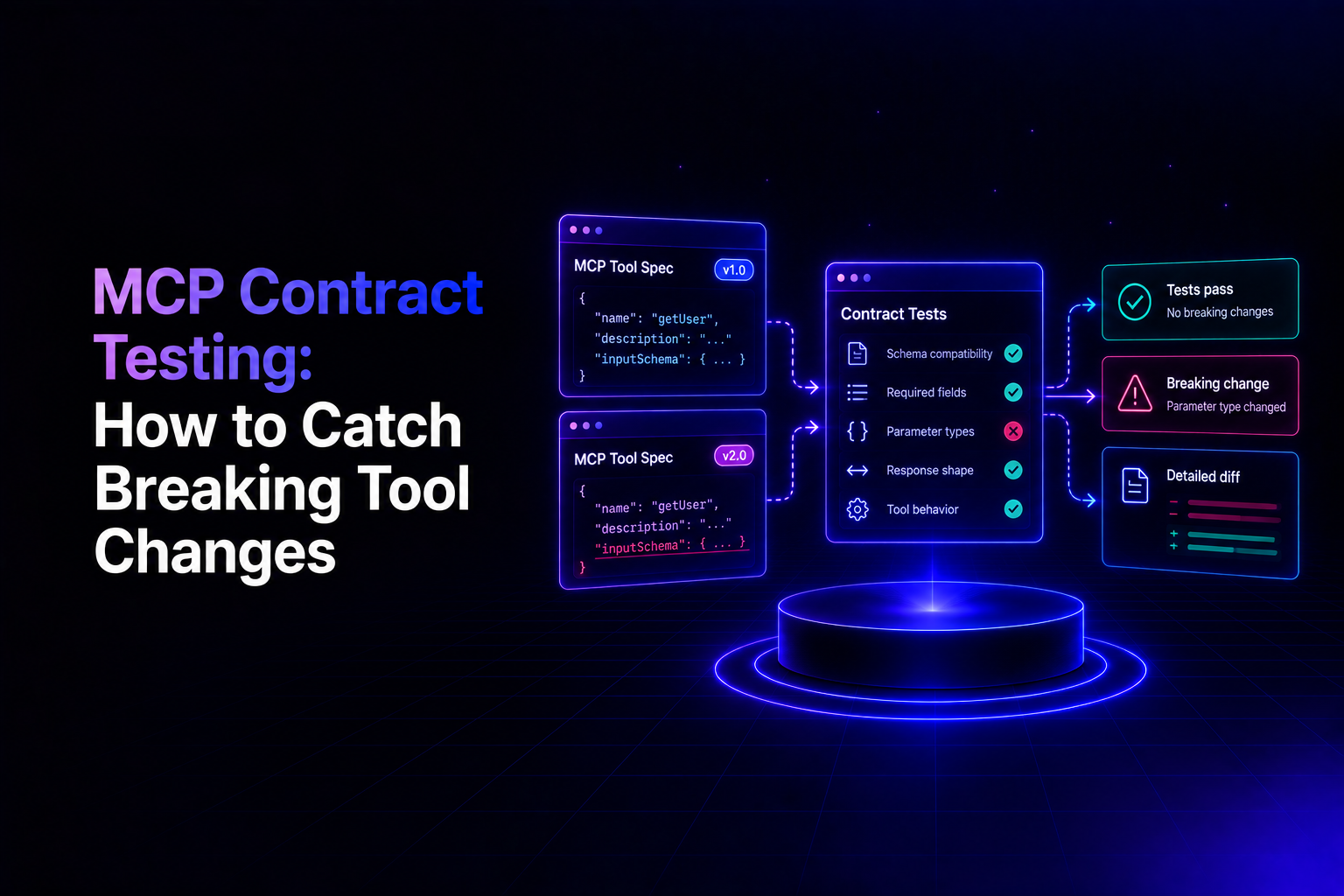
This is MCP contract drift. Contract testing catches it before release by comparing what your server exposes now with what you last approved.
This guide covers which changes matter, how to check them in CI with official MCP tooling, and how to ship a breaking change without breaking the agents that depend on you.
What Is MCP Contract Testing?
MCP contract testing verifies that changes to a server's tools remain compatible with the agents and applications already using them.
The contract is what a client receives from tools/list. Under the MCP specification, each tool definition carries:
- A name and a description
- An
inputSchemalisting its parameters and which are required - An optional
outputSchemafor structured results - Optional annotations that hint at behavior, such as whether a tool only reads data
Models read these definitions to decide which tool to call and what arguments to send. Uptime monitoring tells you the server answers. Contract testing tells you whether its interface still matches what consumers expect.
The protocol has a change signal of its own. A server that declares the listChanged capability can notify subscribed clients through notifications/tools/list_changed. That tells a client the list is different. It does not say whether the difference is safe.
Who Breaks When an MCP Tool Changes?
Not every consumer breaks the same way, and the difference decides what you test.
An LLM agent that fetches the tool list at the start of each run will see a renamed parameter and may adapt. The consumers most likely to break on a rename are the ones holding an old copy of the contract:
- Clients that cache the tool list. The 2026-07-28 revision of the specification lets servers attach a cache lifetime to
tools/listresponses. - Application code that calls a tool by name with fixed arguments
- Allowlists and permission rules keyed to tool names
- Prompts, evaluations, and saved workflows that mention a tool or parameter by name
Consider this change:
Tool: search_orders

- Required: query
+ Required: search_query
A stale caller still sends query. Calling an unknown tool should produce a protocol-level error. A missing or invalid argument may produce a validation error, depending on how the server implements the tool.
The change that hits live agents hardest is quieter:
Tool: search_orders

- Description: Search orders by customer name, email or order ID.
+ Description: Look up records.
The schema is identical, so every existing request is still valid. But the model now has less to go on when choosing between search_orders and a similar tool, and it may pick the wrong one.
No error is raised. The task simply stops completing.
For more on how thin definitions mislead agents, see Why API Specs Break AI Agents.
Which MCP Tool Changes Should Block a Release?
A workable policy sorts every change into one of three classes: block, review, or allow.
Changes that should block a release
- Tool removed or renamed. Stale callers may fail because the original tool no longer exists.
- Required parameter added, or an optional one made required. Previously valid calls fail validation.
- Parameter type or enum narrowed. Values that were accepted are now rejected.
- Field removed from the output schema, or its type changed incompatibly. Code that parses the result may fail.
Changes that need review
- Description rewritten. Tool selection can shift with no schema change.
- Annotation changed, such as read-only to not read-only. Clients may use annotations to decide when to request user confirmation.
- New tool overlaps an existing one. The model now has two plausible choices.
- Authorization scope tightened. Calls that worked may start being denied.
Changes that are usually safe
- Optional parameter added. Existing calls are generally unaffected.
- Accepted values widened. Previously accepted values remain valid.
- Clearly distinct tool added. Existing calls are generally unaffected, though every tool adds context for the model to read.
These are starting points. The same change can be fine for an internal agent you redeploy alongside the server and breaking for a partner's agent you do not control.
Decide the policy per consumer, and write it down.
How Do You Automate MCP Contract Testing in CI?
The method needs no special contract-testing platform: save the approved contract, compare the live one against it on every pull request, and make changing the saved copy a reviewed act.
Step 1: Capture the approved contract
The official MCP Inspector has a CLI mode built for scripts and CI.
This command writes your server's tool definitions to a file, sorted so that diffs stay stable:
npx @modelcontextprotocol/inspector --cli https://your-server.example.com/mcp \
  --transport http --method tools/list --format json \
  | jq -S '.result.tools | sort_by(.name)' > contract/tools.json
Create the contract directory first and commit contract/tools.json to version control.
The specification allows the tool list to vary with the caller's authorization, so if different roles see different tools, capture one file per role by adding an appropriate authorization header.
Make sure your snapshot includes the complete tool list if your server uses pagination.
Step 2: Compare on every pull request
This GitHub Actions workflow starts the server, takes a fresh snapshot, and fails if it differs from the committed one.
Replace the start command and port with your own.
name: MCP contract check

on: pull_request

permissions:
  contents: read

jobs:
  contract:
    runs-on: ubuntu-latest

    steps:
      - uses: actions/checkout@v4

      - uses: actions/setup-node@v4
        with:
          node-version: 22

      - name: Start the server under test
        run: |
          npm ci
          npm start &
          timeout 30 bash -c 'until (echo > /dev/tcp/127.0.0.1/3000) >/dev/null 2>&1; do sleep 0.5; done'

      - name: Snapshot the live tool contract
        run: |
          npx @modelcontextprotocol/inspector --cli http://localhost:3000/mcp \
            --transport http --method tools/list --format json \
            | jq -S '.result.tools | sort_by(.name)' > current-tools.json

      - name: Fail on unreviewed contract changes
        run: diff -u contract/tools.json current-tools.json

      - name: Check protocol conformance
        uses: modelcontextprotocol/conformance@v0.1.11
        with:
          mode: server
          url: http://localhost:3000/mcp
The readiness check waits for the server's port to accept connections. The subsequent Inspector request verifies that MCP tool discovery works.
Any difference fails the build. To accept a change, regenerate contract/tools.json in the same pull request, so the contract diff appears in code review next to the code that caused it.
Never regenerate the baseline automatically in CI. That approves every change without anyone reading it.
A plain diff tells you that something changed, not how serious it is.
Several open-source tools add classification on top of the same snapshot idea. mcpward fails by default on removed tools, changed descriptions, and breaking schema changes, and can also run behavioral test cases. mcpdrift and mcpvet take a similar approach.
These are young projects, so check how actively each is maintained and pin a version before your build depends on one.
Step 3: Check protocol conformance separately
The last step of the workflow runs the official MCP conformance framework, which tests a server against the specification.
Conformance and contract compatibility are different questions.
A server can follow the protocol perfectly while shipping a tool change that breaks every consumer.
Step 4: Test real agent tasks
A diff cannot tell you whether an agent still completes its work.
Keep a small set of representative tasks, such as find a customer's latest order and return its payment status, and run them after any change to a description or to tool behavior.
Model output varies between runs, so run each task several times and assert on the tool-call trace: which tools were called, with which arguments, and whether the expected operations and outcomes occurred.
Do not assert on the wording of the final answer.
How Do You Ship a Breaking MCP Tool Change Safely?
Sometimes the contract has to change. Treat it like any API deprecation:
- Add, don't replace. Introduce the new parameter, or a new tool such as
search_orders_v2, alongside the old one. - Say so in the description. Mark the old tool as deprecated and name its replacement. Tool descriptions are an important source of information for agents choosing what to call.
- Watch usage. Log calls per tool and per consumer so you know who still depends on the old contract.
- Remove on a date. Announce the removal window, then delete the old tool once traffic has moved.
Running both versions for a while costs some context, because the model reads two definitions.
That is cheaper than a partner's agent failing in production.
What Can't a Contract Diff Catch?
A schema can stay the same while the tool behaves differently.
Consider a payment tool that accepts valid parameters but creates a duplicate charge when an agent retries after a timeout.
No diff will flag it, because the definition never changed.
Behavioral tests should cover:
- Invalid input. Does the tool reject malformed or missing arguments with a message the model can act on?
- Authorization. Can each consumer call only the tools it is meant to?
- Retries. Are repeated calls to state-changing tools safe?
- Output. When a tool declares an
outputSchema, the specification requires its structured results to conform. Verify that they do. - Annotations. The specification tells clients to treat annotations as untrusted unless the server is trusted. Test what a tool does, not what it claims.
What Changes When MCP Servers Are Generated from APIs?
Many MCP servers are not hand-written. They are generated from an OpenAPI specification or directly from API code.
In that setup, the tool contract sits downstream of the API contract: a response field removed from the API, or a scope tightened on it, becomes a changed tool the next time the server is generated.
A tool-surface check still catches the change, but late, after the API commit that caused it has merged.
Two things work better upstream:
- Diff the API contract on every commit, before tools are regenerated.
- Set policy per consumer. An internal service can absorb a change with a warning. A partner or agent integration usually needs approval first.
This is the approach we took with Elva, Theneo's API management platform.
Elva's API contracts define what each audience sees, diff every commit against those contracts, classify changes as breaking, compatible, or cosmetic, and apply a per-contract policy to block, warn, or notify.
MCP tools are generated from the agent contract, and tool schemas are verified against live API responses before a server is published.
Elva API Testing connects testing with those contracts, so teams can check whether their APIs continue to satisfy the definitions used to generate agent-facing tools.
That covers servers Elva generates. A hand-written MCP server still needs the tool-surface check described above.
CI triggers and scheduled test runs are part of Elva's Business and Enterprise plans.
How Do You Prepare an MCP Server for Release?
Before publishing a new server version, check six things:
- Contract: Has the live tool list been compared with the approved baseline?
- Classification: Is every difference sorted into block, review, or allow?
- Consumers: Do you know which agents and applications use the affected tools?
- Behavior: Do the tools still handle bad input, retries, and authorization correctly?
- Agent tasks: Do representative tasks still complete across repeated runs?
- Baseline: Was the approved contract updated in a reviewed pull request?
Final Thoughts: Make Breaking MCP Changes a Release Decision
An MCP server that stays online is not necessarily one agents can still use.
Tool definitions are the interface, and they change with ordinary commits.
Start small: commit a baseline, diff it on every pull request, classify what changed, and run a handful of agent tasks.
Add the upstream check when your tools are generated from APIs and more than one team or partner depends on them.
If that is your situation, see how Elva generates and governs MCP servers from API contracts.
References
Frequently Asked Questions
What is MCP contract drift?
MCP contract drift happens when a server's tool definitions or behavior change without a compatibility review. It can cause agents to send invalid requests, select the wrong tool, or fail tasks that previously worked.
Can MCP contract testing be automated?
Yes. Save the full tools/list output as a reviewed baseline, compare it against the server in CI, and flag unreviewed changes. Add protocol conformance checks and representative agent-task tests.
Is rewriting a tool description a breaking change?
It can be. The schema may remain compatible, but a rewritten description can change which tool an AI agent selects. Review meaningful edits and rerun targeted agent evaluations.
Does protocol conformance guarantee tool compatibility?
No. Conformance checks whether a server follows the MCP specification. It does not establish that changed tools, descriptions, schemas, or behavior remain compatible with existing agents.
Can contract testing prevent breaking changes?
Contract testing detects risky changes. Prevention requires an enforcement step, such as a blocking CI check or an approval policy before a breaking change can ship.